AI Index
Function Overview
This feature allows you to ask questions using abbreviations, such as "Alibaba" or "Mate 40". The system will automatically convert these into the full company or product names and generate the correct query statements, ensuring you can accurately retrieve data. It is suitable for scenarios where the database stores full names, but users are accustomed to asking questions with abbreviations.
How to Use This Feature
- Default Settings: The system will automatically enable AI Index for certain fields. By default, the enabled fields are short text of string type, excluding long text, date, numbers, etc. These fields help AI match user questions more accurately.
- Manual Configuration: If you want to enable or disable the search function for other fields, you can use the toggle button. Simply click the toggle next to the field you want to adjust and choose to enable or disable it.
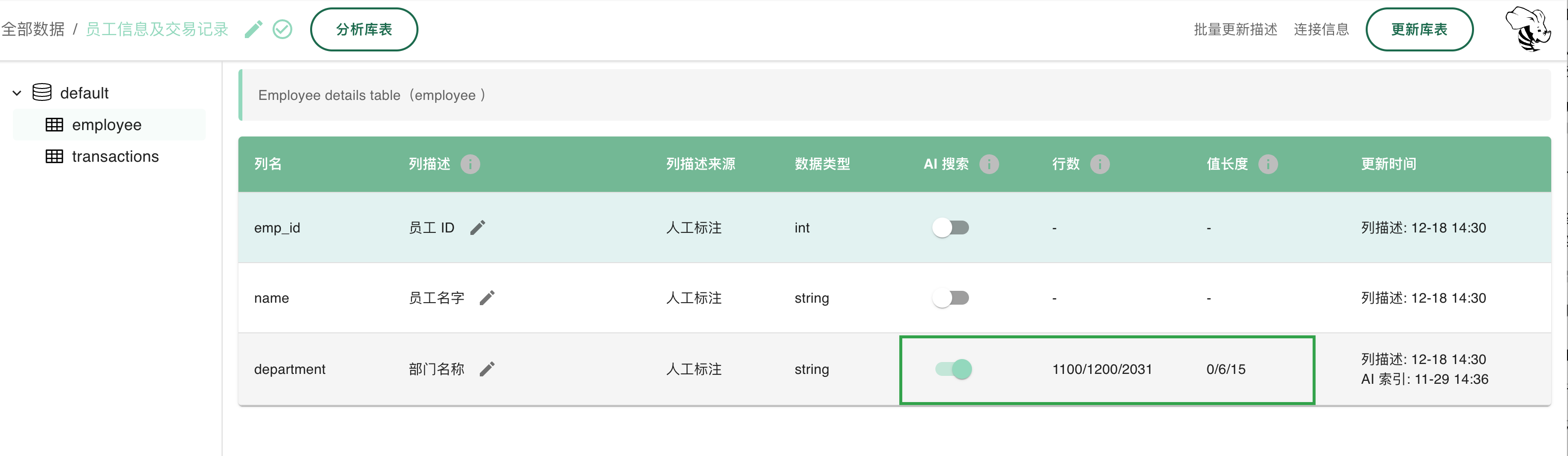
Why do we need a toggle button?
In some cases, enabling too many indexes may affect the system's performance, as each index consumes certain computing resources. A large amount of irrelevant index information can become noise, interfering with AskTable's analysis and judgment of questions. Therefore, we provide a control switch that allows you to enable or disable the index function for certain fields based on your actual needs.
- Enable AI Index: AI will be able to better understand and match your questions, improving query accuracy.
- Disable AI Index: It can improve system performance, but may sacrifice some query accuracy.
What is the difference between AI Index and Terms (Synonyms)?
Both can be used to improve the accuracy of AI queries, but their usage scenarios differ:
- AI Index (Fuzzy Search): AI Index identifies similar queries through fuzzy matching. It is suitable for keywords that exist clearly in the database, but users refer to them using abbreviations in questions. These could be company names, product names, etc., numbering in thousands or tens of thousands. It is recommended to use AI Index without manually configuring synonyms.
- Add Terms (Synonyms): Used to handle business terms of companies. These terms do not directly appear in the database, but they appear in user questions. AskTable needs to understand these terms to correctly comprehend user intent and business context. For example, setting "Iron Box" as a synonym for "Engine" ensures that AskTable does not respond with irrelevant information about iron boxes. Additionally, it can also include business metrics. For personalized or organization-specific vocabulary, it is recommended to use the term function.
Summary
- Default Enabled: Suitable for most scenarios, the system will automatically enable AI indexing for certain fields.
- User Configuration: You can manually enable or disable the AI indexing function for fields, allowing flexible adjustments.
- Performance Optimization: Too many indexes may affect system performance. It is recommended to configure according to your needs.
By configuring the AI Index function, you can enhance the flexibility and accuracy of AI queries while optimizing system performance based on actual needs.
User Notes
- Enabling the AI Index function may increase the system's computational load. It is recommended to activate it only when necessary.
- The default enabled fields have been optimized and are suitable for most user scenarios.