AskTable AI Large Model
Overview of This Page After completing the basic deployment of AskTable, you can customize the AI model used through a simple configuration file. This guide will help you quickly complete the model configuration.
Creating the Configuration File
In the same directory as the docker-compose.yaml file, create a file named asktable-models.yaml and enter the following content:
default:
    name: (Recommended) AskTable Default Model
    fast: asktable-fast
    omni: asktable-omni
    agent: asktable-agent
    sql: asktable-sql
    report: asktable-report
deepseek:
    name: (Recommended) DeepSeek
    fast: deepseek-v3.2
    omni: deepseek-v3.2
    agent: deepseek-v3.2
    sql: deepseek-v3.2
    report: deepseek-v3.2
qwen-online:
    name: (Recommended) Alibaba Qwen (Online)
    fast: qwen-turbo
    omni: qwen-plus
    agent: qwen3-max
    sql: qwen3-coder-plus
    report: qwen3-max
qwen3:
    name: (Recommended) Alibaba Qwen 3
    fast: qwen3-30b
    omni: qwen3-235b
    agent: qwen3-235b
    sql: qwen3-235b
    report: glm-4.6
qwen-80b:
    name: (Recommended) Alibaba Qwen 3 80B
    fast: qwen3-80b
    omni: qwen3-80b
    agent: qwen3-80b
    sql: qwen3-80b
    report: qwen3-235b
qwen:
    name: (Recommended) Alibaba Qwen 2.5
    fast: qwen2.5-72b
    omni: qwen2.5-72b
    agent: qwen2.5-72b
    sql: qwen2.5-72b
    report: qwen3-235b
Explanation:
fast: Fast question-answering modelomni: General analysis modelagent: Agent reasoning modelsql: SQL generation and analysis modelreport: Analysis report generation model
Mounting the Configuration File
In the docker-compose.yaml file under services: asktable, find the volumes configuration and add the following mount:
    volumes:
    - ./asktable-models.yaml:/etc/asktable-models.yaml
This way, asktable-models.yaml will be mapped to /etc/asktable-models.yaml inside the container for use by AskTable.
Restarting the Service
After making the changes, go to the directory where docker-compose.yaml is located and execute the following command to apply the configuration:
docker compose down
docker compose up -d
At this point, AskTable will automatically load your defined model configuration.
Verifying the Model Configuration
After restarting, log in to the AskTable management console, go to the "Project Settings" page, scroll down, and you should see the newly added model options. As shown in the following image:
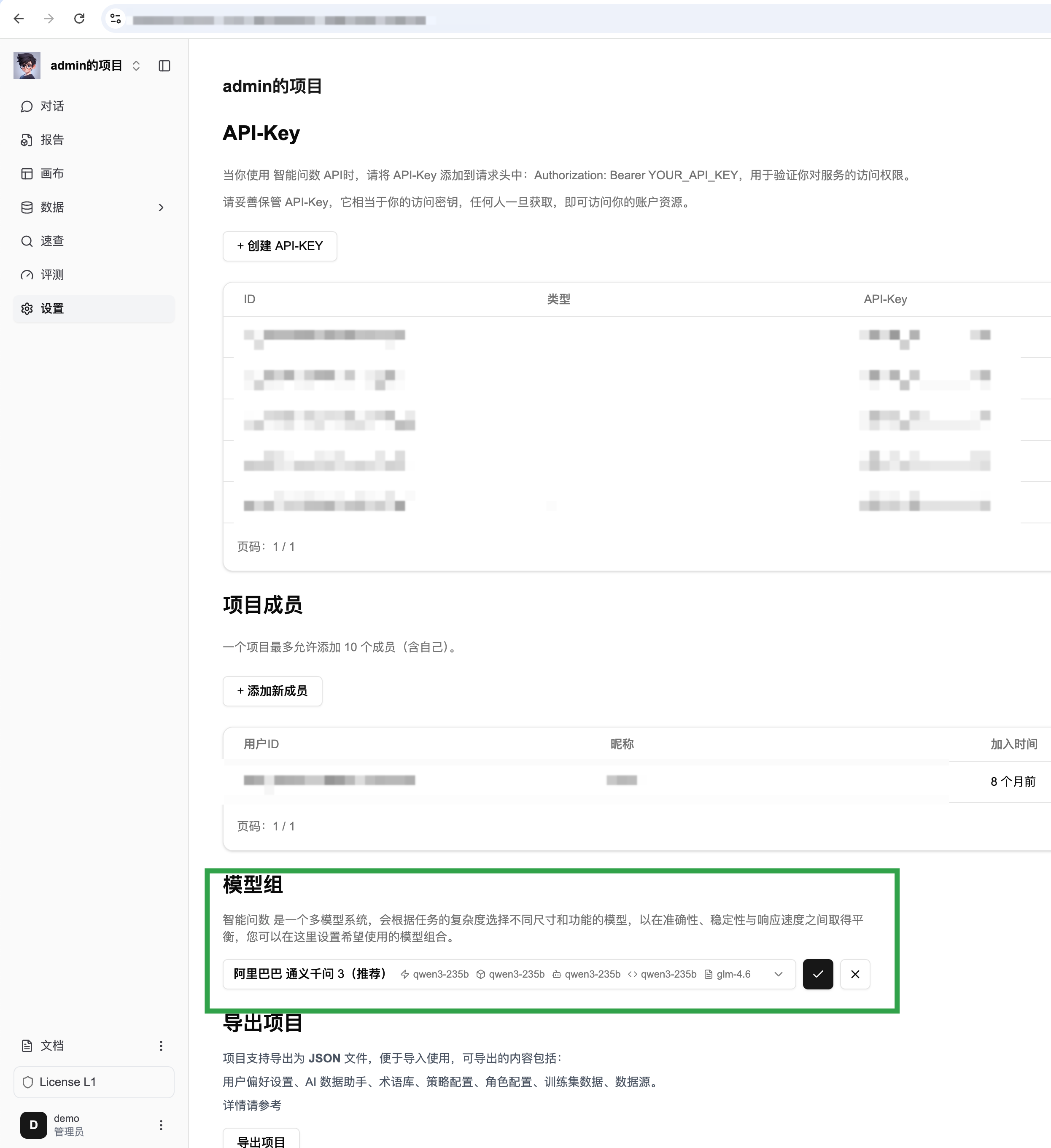
If it doesn't take effect, please check the following points:
- Confirm that the path and content of the
asktable-models.yamlfile are correct. - Ensure that the configuration file has been correctly mounted in
docker-compose.yaml. - Execute
docker logs asktableto check if there are any errors related to loading the model.
Notes
- Recommended Combinations: It is recommended to use the
AskTable Default ModelorDeepSeek, which have been verified in more scenarios. If you need other models, please contact AskTable technical support. - Version Updates: When updating the AskTable version, make sure that the
asktable-models.yamlfile is still mounted.
🎉 Congratulations! You have successfully configured the AskTable model. Now you can flexibly switch and use various models according to your needs.